Turn egocentric video into queryable world memory
A scene graph converts first-person observations into objects, relations, timestamps, and provenance. That structure lets a system ask what was visible, what the hand touched, and what task state was active.
Sample Graph
Memory Graph At A Glance
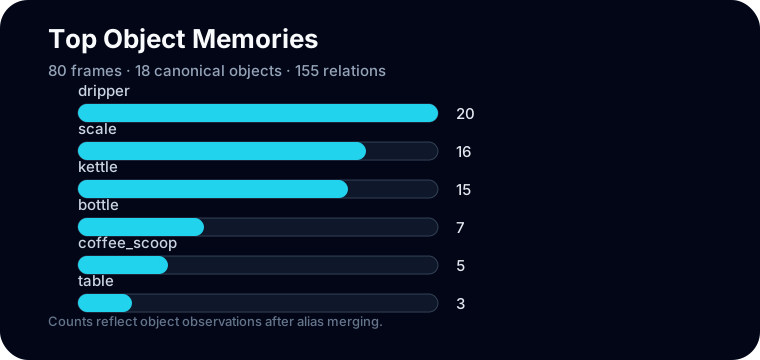
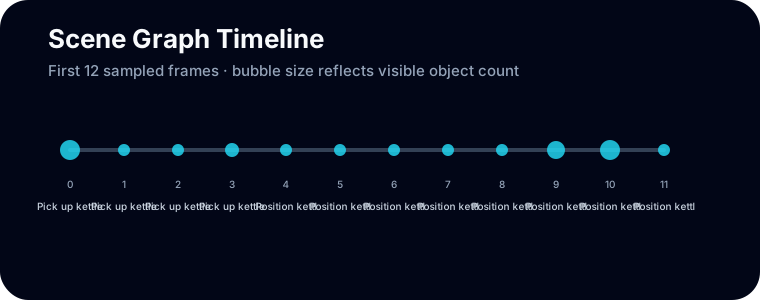
The graph is not a picture of pixels. It is a memory structure: objects become nodes, interactions become edges, and timestamps make the graph temporal.
These query patterns are intentionally simple so the output is easy to inspect before adding detector or language-model components.
Explore A Query
This panel reads the sample `scene_graph.json` and renders object, interaction, and state views directly in the browser.
Object memory: kettle
The object timeline shows where the kettle appears across task segments and which interaction text is attached to each timestamp.
Graph Building Blocks
`kettle`, `scale`, `coffee_dripper`: entities that persist across frames.
`hand_grasps(kettle)` or `visible_in(kettle, frame)` connects entities.
Records whether a fact came from caption objects, interaction text, or action labels.
Concept Studio
These ideas turn video annotations into a memory that can be queried. Click a concept to see the structure behind it.
Scene graph
A scene graph is a structured memory: nodes are objects or actors, and edges are relations such as visible_in or hand_grasps.
Schema Checklist
timestamp, subtask, action, objects, camera pose
name, aliases, first seen, last seen, observations
type, subject, object, timestamp, confidence
where each graph fact came from
Run This Locally
pip install -e ".[dev]".ego-scene-graph --graph-json outputs/sample_graph/scene_graph.json --query object:kettle --query state:last
Detector JSON Preview
{
  "detections": [
    {"frame_index": 12, "objects": [{"label": "mug", "track_id": "track-7", "confidence": 0.91}]}
  ]
}
Live Graph JSON Preview
Loading scene_graph.json...